
Forum Replies Created
You must be logged in to create new topic or reply to the topic. Click To Login
- AuthorPosts
You can hide search for mobile by adding the below CSS code in the Custom CSS option of Ivory Search plugin settings on the path Ivory Search -> Settings -> Settings
@media ( max-width: 921px ){ .main-navigation li.is-menu { display: none; } }I hope you are well today and thank you for your question.
Your shared staging site is password protected so it is not accessible.
The search is working fine for me on your live site on the below page.
https://legal-planet.org/?s=test
Please advise.
Best regards,
Ivory Search SupportNovember 9, 2019 at 12:07 PM in reply to: Viewing search results specifically (and not entire page) #3335I hope you are well today and thank you for your question.
Currently, the plugin does not provide this functionality but we will consider this to be implemented in the future version of the plugin.
Best regards,
Ivory Search SupportI hope you are well today and thank you for your question.
To achieve this, you have to configure the search form to display content excerpts in the search results and add excerpt text in the Excerpt field of that page which will be displayed in the search results.
Best regards,
Ivory Search SupportI understood the issue now that it displays differently on different screen resolutions.
You have to make the changes in the theme header.php file by contacting your Infinity Pro theme author to display it on the right side of your website header.
I hope you are well today and thank you for your question.
Please try just changing your shared CSS code as following.
#contents .is-search-form label {
width: 90%;
}
#contents .is-search-form input.is-search-input {
width: 100%;
}
Best regards,
Ivory Search SupportI could confirm the issue that on some mobile devices the AJAX search results do not get popup automatically.
I will resolve the issue in the next version of the plugin ASAP.
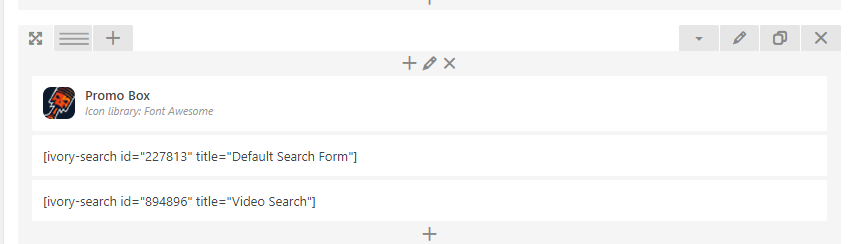
Thank you for the explanation. I tried doing this but when inserting the new created shortcode, it disappeared from the page and I am not sure why. If I put back the ‘default’ search it works fine, but any new search form I insert does not work.
You can see here, I put two search forms but only the default one shows.
Please make sure that the Video search form having ID 894896 exists and try resetting that search form by clicking on the Reset button.
I am also referring that search form as displayed in my above-shared screenshot which is working fine.
Could you please tell me which keyword you are searching for there and also try searching just “a”?
I have already provided you the CSS code above to achieve it and it is displaying fine for me.
Could you please share with me the screenshot of how it is displaying for you?
Also, please try using a different browser.
- AuthorPosts

You must be logged in to create new topic or reply to the topic. Click To Login